
Product Scanner
Fast barcode scanning for quicker B2B ordering
Product Scanner gives your customers, dealers, and internal teams a faster way to find products and add them to cart using a barcode or UPC.
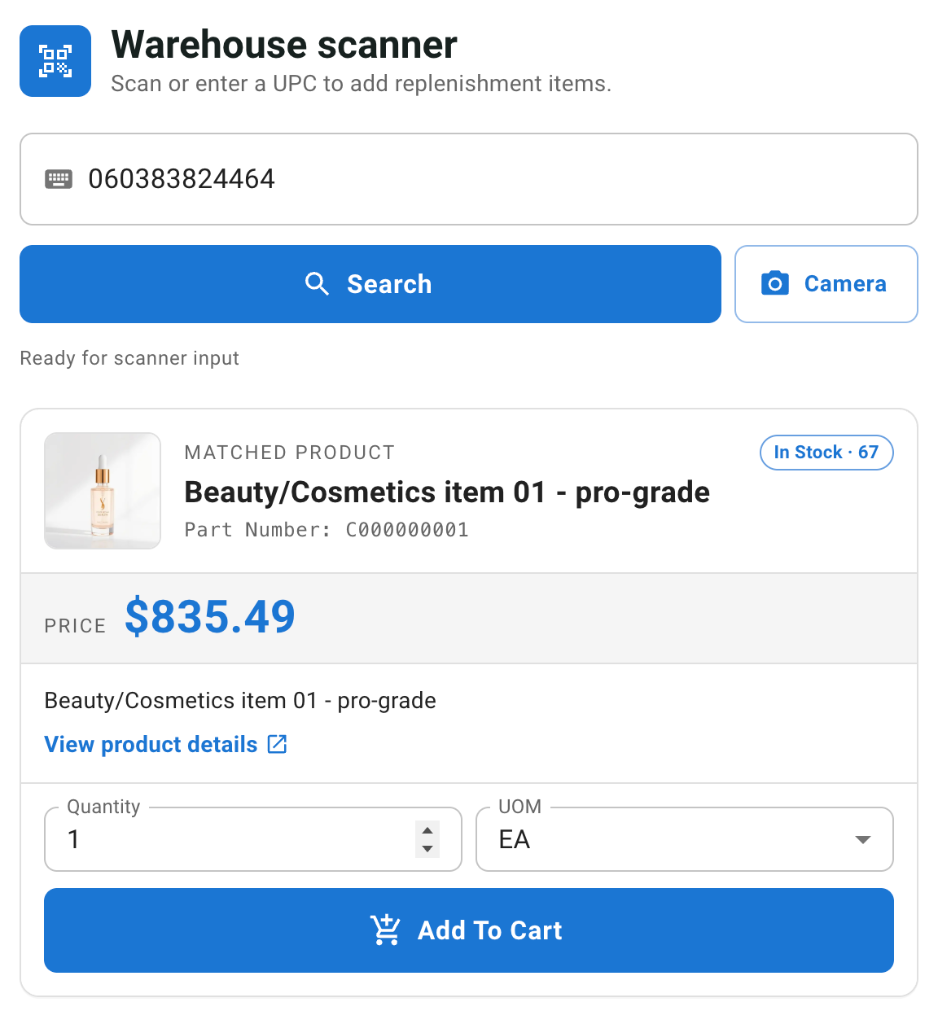
Instead of searching manually, users can scan a product barcode using their device camera, a connected scanner, or manual barcode entry. Once a match is found, the product details are displayed instantly so the user can confirm the item, choose quantity and unit of measure, and add it directly to cart.
Built for replenishment ordering
Product Scanner is ideal for customers who reorder from shelves, stockrooms, warehouses, service counters, or job sites.
Whether they are restocking commonly used products or building an order from physical inventory, the scanner helps reduce search time, avoid product selection mistakes, and make repeat ordering more efficient.
Key Benefits
Find products faster
Users can scan or enter a barcode to quickly locate the matching product without browsing categories or typing product names.
Reduce order entry errors
Barcode-based lookup helps users select the correct product, especially when items have similar names, descriptions, or part numbers.
Support mobile and desktop workflows
Product Scanner works with device camera scanning where supported, while also allowing manual entry or hardware barcode scanner input.
Streamline replenishment orders
Perfect for customers, dealers, or staff who build orders while walking shelves, checking inventory, or reviewing stock needs.
Keep access controlled
Product Scanner access can be controlled by storefront permissions, allowing admins to decide which users or roles can use the scanner workflow.
How It Works
- The user opens the Product Scanner page.
- They scan a barcode using their camera, a hardware scanner, or manual entry.
- The storefront looks up the matching product by UPC/barcode.
- If a match is found, the product details are displayed.
- The user selects quantity and unit of measure.
- The product is added directly to cart.
Product Details Displayed
When a barcode match is found, users can review key product information before adding the item to cart, including:
- Product title
- Part number
- Product image
- Price, where visible
- Available stock, where visible
- Unit of measure options
- Product detail link
- Add-to-cart availability
Flexible Access Controls
Product Scanner is permission-based, so access can be limited to the users who need it.
Admins can configure the access condition through the Admin Portal, making it easy to enable the scanner for specific customer groups, dealers, internal users, or other approved storefront users.
Ideal Use Cases
Customer replenishment
Customers can walk their shelves, scan products they need to reorder, and quickly build a cart.
Dealer ordering
Dealers can scan product labels or packaging to quickly place repeat orders with fewer lookup steps.
Counter or warehouse ordering
Internal users can use scanning to speed up order building in environments where products are physically handled.
Field or service ordering
Users outside the office can scan products or parts and add them to cart from a mobile device.
Designed for Storefront Workflows
Product Scanner is built into the Terracor Storefront experience and connects directly with existing product, pricing, stock, unit of measure, and cart functionality.
It uses your existing product UPC/barcode data and respects storefront visibility rules, permissions, pricing display, stock display, and add-to-cart availability.
Make Product Ordering Faster
Product Scanner helps customers and teams move from product identification to cart faster, especially in repeat ordering and replenishment workflows.
It is a practical add-on for businesses that want to reduce manual searching, improve order accuracy, and make ecommerce easier for users working with physical inventory.
Request Info