
Visual Parts Finder
Enable customers to quickly find and order the correct replacement parts by clicking on interactive exploded diagrams of your products. Reduce errors, cut RMAs, and make parts ordering faster and easier for everyone.
Why Visual Parts Finder?
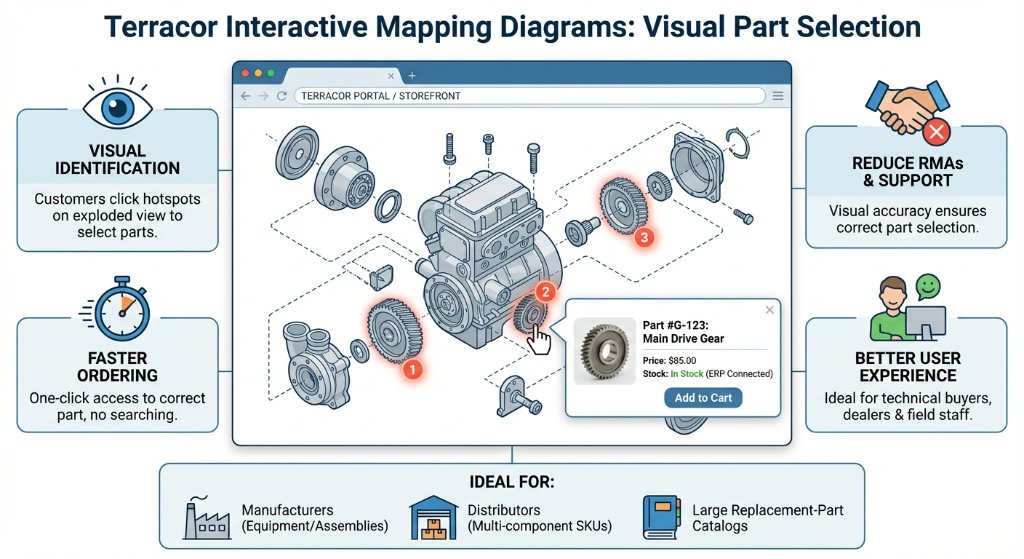
Visual Identification
Customers click numbered hotspots on an exploded view to select parts.
Fewer RMAs & Support Calls
Visual accuracy helps ensure the right parts are ordered the first time.
Faster Ordering
One-click access to the correct part — no manual searching or guesswork.
Better User Experience
Ideal for technical buyers, dealers, and field staff working with complex equipment.
See It In Action
What It Does
Link Parts to Diagrams
Link specific inventory parts to precise coordinates on a schematic or exploded-view diagram.
Sell Products & Parts Together
Sell whole products and their replacement parts together from your online web store.
Live Stock & Pricing
Display live stock quantities and pricing for both whole products and replacement parts.
Click-to-Cart
Let customers click a numbered icon on the diagram to see full details and add the part to the cart.
Unlimited Mappings
Assign unlimited replacement parts to a whole product, and apply image maps to an unlimited number of products.
Ideal For
Manufacturers
Of equipment, machinery, and assemblies.
Distributors
Managing multi-component SKUs and spare parts catalogs.
Large Part Catalogs
Companies with large replacement-part catalogs that want to reduce support overhead.
Accuracy-Focused Teams
Teams looking to improve accuracy and speed of online parts ordering.
See Visual Parts Finder in Action
Give your customers a visual way to select the right parts and streamline your replacement-part ordering process.